Two Machines, One Producer: Making a Windows-Linux Hybrid Setup Actually Work
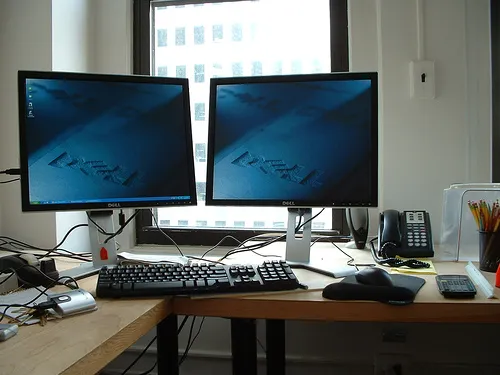
Photo: Unknown, CC BY 2.0, via Wikimedia Commons
The dream of an all-Linux production environment is real, and for a growing number of producers it's fully achievable. But there's a quieter group of producers who've looked at that dream, looked at their plugin folder, and made a different call: run both.
Dual-boot setups and dual-machine rigs aren't a failure state. For certain workflows and certain catalogs of plugins, they're the most pragmatic answer available. The trick is building the hybrid without letting it eat your time and momentum.
Why Producers Are Running Hybrid Setups in the First Place
The honest answer is plugin availability. Linux has made enormous strides in native audio tooling, but the commercial plugin ecosystem — particularly in areas like orchestral libraries, certain hardware emulations, and some vocal processing tools — still skews heavily toward Windows and macOS. Developers who haven't prioritized Linux builds aren't necessarily hostile to the platform; many are simply small teams stretched thin.
For producers whose sound is built around specific Windows-only plugins, abandoning them entirely isn't always realistic. A film composer who's spent years building template sessions around a particular orchestral library doesn't have a drop-in Linux substitute. A hip-hop producer whose drums live in a sampler that only runs on Windows isn't going to rebuild their sound identity because of platform principle.
So they keep Windows around. Just not as their primary environment.
The Dual-Boot Reality Check
Dual-booting is the entry-level version of the hybrid approach, and it works — with caveats. The appeal is obvious: one machine, two operating systems, full access to each platform's tools without the cost of additional hardware.
The friction shows up in the transitions. Rebooting to switch environments breaks creative momentum in a way that's hard to overstate. If you're in a flow state on your Linux setup and you realize you need a Windows-only plugin, the decision to reboot is essentially a decision to stop what you're doing, wait several minutes, reload your session in a different DAW, do the thing you needed, export, reboot again, and pick up where you left off.
In practice, a lot of producers describe dual-boot as a "weekend project" setup — they'll book time specifically to work on Windows-dependent elements rather than switching on the fly. That's a workable rhythm, but it requires discipline and planning that not everyone has bandwidth for.
File management is the other dual-boot headache. Audio projects generate a lot of files, and keeping project folders, sample libraries, and renders accessible across both operating systems requires either a shared partition formatted in a way both systems can read (exFAT is common) or a networked storage solution. Neither is complicated, but both require upfront setup and ongoing attention.
The Dual-Machine Approach: More Cost, Less Friction
Producers who've been running hybrid setups for a while often graduate to separate machines. The cost is real — you're maintaining two computers — but the workflow benefits are significant.
With two machines, you can have both environments running simultaneously. A common setup is a Linux workstation handling the bulk of production work — mixing, arrangement, processing — with a Windows machine (often a cheaper secondary rig or a laptop) dedicated to specific plugin-dependent tasks. Some producers use a KVM switch to share a single monitor and keyboard between both machines without physically moving anything.
Derek O., a producer and mix engineer based in Chicago, has been running a dual-machine setup for about three years. "I do probably 80 percent of my work on Linux now," he said. "The Windows box is basically a plugin server for three specific tools I can't replace. Once I stopped treating it as my main machine, I stopped resenting it."
That framing — Windows as a specialized tool rather than a competing environment — seems to be the mental model that makes dual-machine setups sustainable.
Sync Strategies That Don't Drive You Crazy
File synchronization between two machines is where hybrid setups can quietly fall apart. Here are the approaches that actually work in practice.
Network-attached storage is the most robust solution for producers working with large sample libraries. A NAS device on your local network can be mounted by both machines and treated as a shared drive. Latency for streaming samples is minimal on a gigabit network, and you avoid the nightmare of maintaining duplicate libraries.
Git-based project versioning sounds like overkill for audio production, but producers who've adopted it swear by it. Keeping your project files — DAW sessions, MIDI, automation — in a Git repository gives you version history and makes syncing between machines straightforward. Audio files themselves are typically excluded (they're too large), but the project scaffold stays consistent.
Cloud sync with selective folders using tools like Syncthing (open-source, self-hosted, works great on Linux) keeps specific project folders mirrored across machines in real time. It's not perfect for large audio files, but for project files and presets it's reliable.
Minimizing Context-Switch Cost
The biggest risk in a hybrid setup isn't technical — it's cognitive. Every time you switch environments, you pay a mental tax. You have to remember where you were, reload the context, and get back into the work.
The producers who manage this best tend to do two things: they batch their Windows work rather than context-switching constantly, and they keep their Linux environment as self-sufficient as possible so that Windows trips are genuinely rare.
Setting up your Linux DAW with template sessions that mirror the structure of your Windows projects helps. When you bring stems or renders back from Windows, they slot into a familiar context rather than requiring you to rebuild orientation.
Is It Worth It?
For producers who are serious about Linux as a primary environment but have legitimate plugin dependencies that haven't been solved yet, the hybrid approach is a reasonable bridge. It's not a permanent solution — the Linux ecosystem keeps improving, and the plugins you're keeping Windows around for may have viable alternatives sooner than you expect.
But in the meantime, a thoughtful hybrid setup beats the alternative of either abandoning Linux entirely or pretending your plugin needs don't exist.