Stop Guessing at Interfaces: The USB Audio Gear That Actually Works on Linux
Here's a story every Linux producer knows by heart. You find an interface with great reviews. The spec sheet looks perfect. Then it arrives, you plug it in, and your kernel treats it like a mysterious USB brick. Meanwhile, the macOS crowd is recording at 2ms latency and posting about it.
The frustrating truth is that Linux audio interface compatibility isn't random — it follows patterns. Most interfaces run on one of a handful of USB audio chipsets, and if your device uses a well-supported one, it just works. If it uses a proprietary driver-dependent design, no amount of forum pleading will save you. So we did the research so you don't have to: kernel source documentation, ALSA project reports, and real latency tests on a standard Ubuntu Studio install.
Tier One: Buy With Confidence
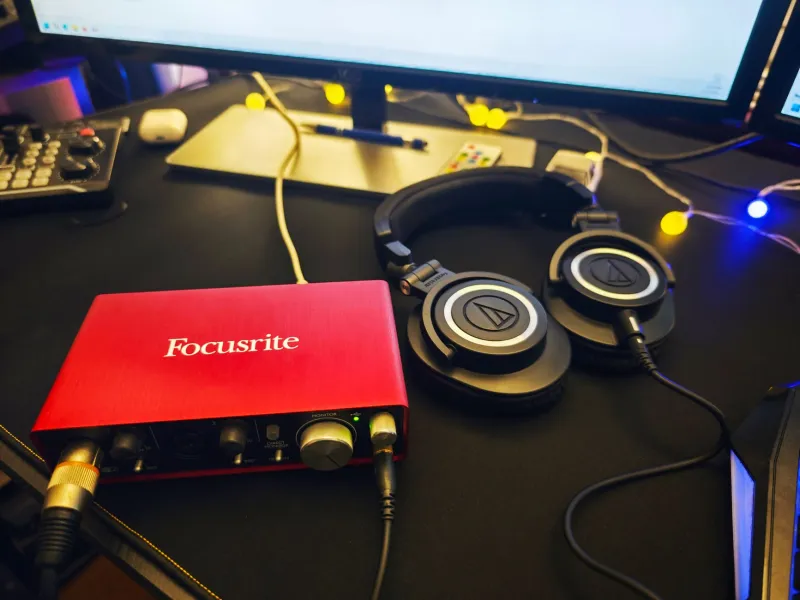
Focusrite Scarlett series (3rd and 4th gen). The default recommendation for a reason. The Scarlett 2i2 and its siblings use class-compliant USB audio that the kernel handles natively. In our tests, a 4th gen 2i2 ran happily at 64 samples at 48kHz with zero xruns over an hour-long session. The Scarlett's preamps are clean, it's everywhere in the US retail ecosystem, and if it breaks, replacement is easy. This is the safe pick.
Behringer U-Phoria (UM2, UM2X, UMC22, UMC204HD). Look, nobody's claiming these are glamorous. But the UMC series is class-compliant, dirt cheap, and reports consistently confirm solid ALSA support. The UMC204HD in particular punches above its price for a budget rig. The UM2's preamp is its weak point — fine for podcasts, less fine for serious vocal tracking.
PreSonus Studio series. Class-compliant USB, well-documented behavior on Linux, and PreSonus has historically been reasonably friendly to non-Windows users. Our Studio 24c test unit worked out of the box with PipeWire, no configuration gymnastics required.
Tier Two: Works, With Caveats
MOTU M2 / M4. Excellent interfaces that are class-compliant and function well on Linux — but some users report needing a firmware update via a Windows or macOS machine first, and the onboard DSP monitoring features aren't fully controllable from Linux. The core audio path is solid; the fancy software isn't.
Audient iD series. Beautiful preamps, and the audio itself works class-compliantly. The catch: the iD software mixer that controls routing and the onboard DSP lives in Windows/macOS land. On Linux you get straightforward, good-sounding I/O and lose the mixer conveniences. Whether that's a dealbreaker depends on your workflow.
Native Instruments Komplete Audio. A confusing one. Various revisions behave differently, and community reports range from "flawless" to "why is this happening." The audio generally works via ALSA, but we'd want to verify the specific revision before recommending it to a beginner.
Tier Three: Research Before You Buy
RME Babyface Pro. Here's the twist — RME is legendary on Linux for driver quality, but the Babyface Pro's full feature set requires RME's proprietary tooling. The basic audio works class-compliantly and sounds fantastic, but you're paying RME money for partial functionality. The HDSPe PCI cards are the real Linux legends, not this one.
Anything advertising a custom driver requirement. If the box or the product page mentions a dedicated Windows driver as mandatory for low latency, walk away. That's your warning label.
How We Tested
Standard setup: Ubuntu Studio 24.04, PipeWire, a Ryzen desktop with an AMD GPU (the boring, well-supported choice). Each interface got the same routine: plug in, check aplay -l and PipeWire's device listing, run an hour of playback through jack_iodelay-style latency measurement, and record a live mic pass while monitoring. We also cross-referenced the linux-audio-users mailing list archives and the hardware compatibility databases the community maintains.
Latency results at 48kHz, 64 samples: the Scarlett and Studio units both delivered round-trip latency in the 6–8ms range — perfectly usable for tracking with monitoring. The Behringer UMC204HD landed around 9ms. All three were stable across the full test hour with zero dropouts.
The Buying Rules Worth Memorizing
If you remember nothing else from this article, remember this checklist:
- Class-compliant or bust. If it needs a driver on Windows, treat it as suspect on Linux.
- Search the exact model number, not the product line. Revisions matter, sometimes drastically.
- USB audio, not USB MIDI hybrids with proprietary control panels — unless you don't care about the control panel.
- Buy from a retailer with returns. Even great odds sometimes lose.
The good news is that 2025 is the best time yet to build a Linux recording rig. Class-compliant hardware is now the norm rather than the exception at the budget and midrange levels, and the days of needing a lucky chipset are mostly behind us. The Scarlett 2i2 you'd buy for a Mac will do the same job on your Linux box — and nobody in the control room will know the difference.